- Specially for converting HD videos, H.264 Converter is currently best H.264 Converter. This AVC H.264 Converter can convert all kinds of H.264 encoded videos to other popular video formats like AVI, MPEG, WMV, DivX, MKV, RM, MOV, XviD, 3GP, FLV, etc.It is also good at converting video to H.264 video like H.264 HD, DivX H.264, XviD H.264 .
Once you have H.264 Converter, you can converts HD movies and audio formats for playback on various digital devices such as SONY PS3, Xbox360, Apple TV, HD DivX/XviD video player. What are you waiting for ? - With this step to step to convert h.264 video
- Free download H.264 Converter and install it. You will see the interface as follows
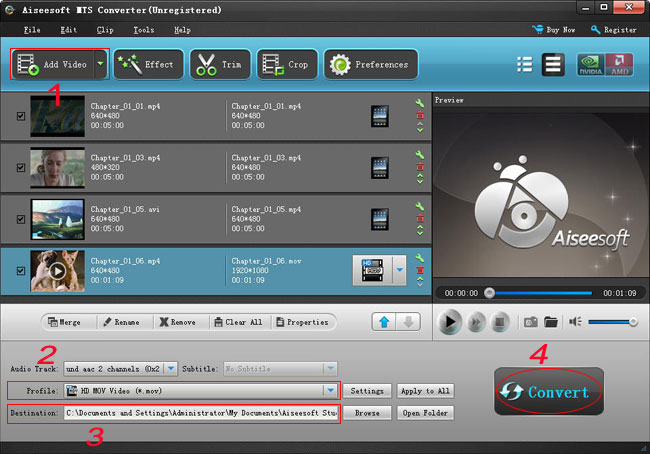
- 1. Add files Click"Add File" button on the toolbar, then select H.264 files you want to convert.
- 2. Set output format Click Profile former drop-down list, choose the right category. Click the next drop-down list , then select the right format. This method helps you find the right output format quickly.
- Tip: To adjust the output settings, click "Settings" button next to Profile drop-down list, and set the parameters of output format in the advanced profile settings window.
- 3. Set output folder Click Browse button to set a destination folder.
- 4. Convert files Click "Convert" button to start converting the files checked in the file list.
- H.264 Converter only needs you several clicks to convert the H.264 encoded videos to any other video format to fit your iPod, Zune, Xbox, Pocket PC etc.
- Hint: There are limitations for free trail that a more than 5 minutes file can only be converted 5 minutes, while a less than 5 minutes file can only be converted half, so you need register it if you want to enjoy full functions.
-