- As an all-in-one HD MOV Converter, it not only can perfectly convert HD MOV video files (or Quicktime HD Video files) to all common format files but also can convert almost all mainstream format videos to HD MOV files.
Moreover, this HD MOV Converter also can convert other HD video files ( like M2TS, MTS, TS, MOD, etc.) to AVI, MP4, VOB, MOV, MPG, MPEG and other format files which respectively for PS3, Xbox 360, Wii, iPhone suchlike PMPs.
In one word, it's worth to free download this HD MOV Converter and have a try. - With this step to step to convert HD MOV to other video formats
- Free download HD MOV Converter and install it.
- 1. Add files - Click
 button on the toolbar, then select HD MOV files you want to convert.
 - 2. Set output format - Click Profile former drop-down list, choose the right category. Click the next drop-down list , then select the right format.
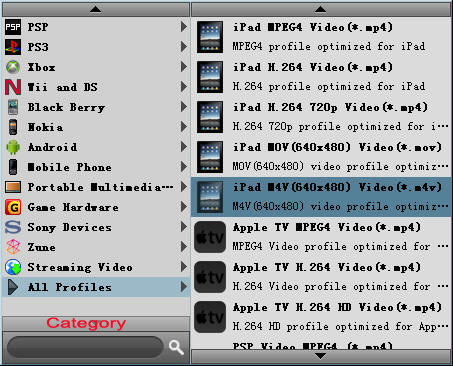
- This method helps you find the right output format quickly.
Tip: To adjust the output settings, click "Settings" button next to Profile drop-down list, and set the parameters of output format in the advanced profile settings window. - 3. Set output folder - Click Browse button to set a destination folder.

- 4. Convert files - Click
 button to start converting the files checked in the file list.
 - As a professional HD MOV Converter, it also provides powerful video editing functions such as clip video segments, crop frame area and adjust frame effects to individualize videos.
-