- MP4 Media Converter is popular MP4 converter software which supports all MPEG-4 encoded video/audio (including AVCHD, M4V, M4A, MP4 etc.). It can transfer MP4 videos and popular other video format like AVI, MPEG, WMV, DivX, XviD, H.264/MPEG-4, MOV, RM, ASF, 3GP etc.
Moreover, MP4 Converter for Mac can convert all HD videos and other popular video formats to diverse portable media players. Thus you can enjoy MP4 videos, HD videos and other popular videos on iPod, PS3, Xbox 360, Wii, iPhone, Smart Phones, Archos, Creative Zen, iRiver, etc. - With this step to step to convert MP4 videos to other video formats
- Free download MP4 Media Converter and install it. You will see the interface as follows.
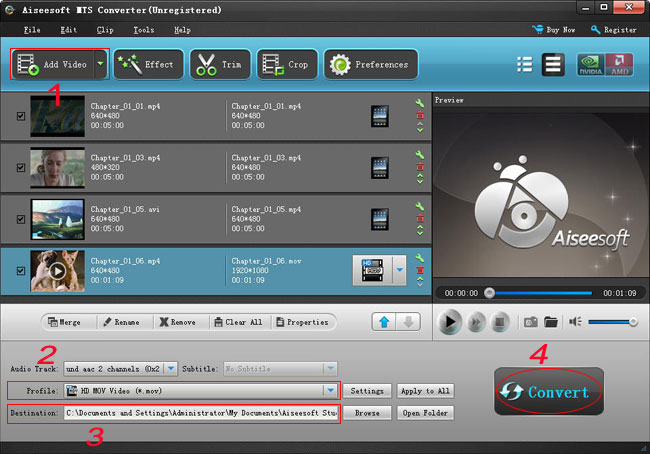
- 1. Add files
- Click"Add File" button on the toolbar, then select MP4 files you want to convert.
- 2. Set output format
- Click Profile former drop-down list, choose the right category. Click the next drop-down list , then select the right format.
This method helps you find the right output format quickly. - Tip: To adjust the output settings, click "Settings" button next to Profile drop-down list, and set the parameters of output format in the advanced profile settings window.
- 3. Set output folder
- Click Browse button to set a destination folder.
- 4. Convert files
- Click "Convert" button to start converting the files checked in the file list.
MP4 Media Converter also provides powerful video editing functions for you to edit videos as you like. -